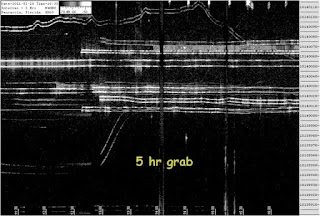
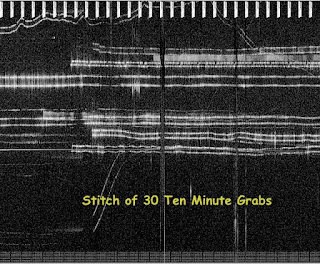
Several nights ago I had my mept on 40m and recorded it's reception on the ON5EX grabber using SiteShoter then stitched the grabs together to see how I did over the long term. I have described this technique previously on this blog. Here's what it looked like:
So, what's this got to do with my air conditioning? When we first moved to this QTH the air condx would cycle on and off on a hot summer day but as the years went by it got to the point of running continuously 24/7 and our electricity bill rose accordingly. Over the winter we had an energy audit courtesy of the local power company and the auditor recommended we have our ductwork checked for leaks and add more insulation in the attic. We followed his advice and as the temps began to climb into the upper 90's (37 C) earlier this month it was a relief to note the air condx was once more cycling on and off. I meant to make a few measurements but haven't had time so far....until the night I recorded the above data.
My mept at the time was a QRP Labs kit which I have found to drift with changes in room temperature and I can see that drift on the ON5EX grabber. It shows the air condx to come on for 10 minutes then off for 10 minutes. The change in temperature is several degrees F based on a previous calibration also describe on this blog.
Consider the irony. I have without intending to do so remotely sensed the performance of my air conditioning system via a facility located in Belgium.
de w4hbk
opening
Regular reports of my grabber activity and that of others, plus information on QRSS software, hardware and technique that comes my way
Showing posts with label stitching. Show all posts
Tuesday, June 14, 2011
Monday, February 28, 2011
Image Stitching


I really like long term grabs as a way to see how the band is doing over time. I utilize simultaneous instances of Spectrum Lab, one a ten minute span useful for ID'ing calls and the other a five hour span which has several advantages. It has a much better noise performance due to the averaging feature in SL which improves SNR by the square root of the ratio of averaging times, 5.5x in this case. This is readily seen in my 5hr grabs where signals not visible at all on the regular 10min one show up as easily noticed traces.
I've also found that for long-term images made by stitching together a number of shorter images the SNR also improves by what seems to be the same as above. That is true for QRSS Stitcher from VD Labs. I should add, not just stitched but also "squished" to screen size. The squishing process also averages the pixels in a way to improve the SNR.
How to Stitch
Download QRSS Stitcher and watch Scott's video on how to use it, on the download page. Next you will need a folder of images to be stitched. Do this with your own grabber or by capturing images from one of the online grabbers using SiteShoter which I described on a previous post. Run Stitcher and follow the prompts, making sure you select "Create a squished image too" and enter the number of images in"Squish to" box....then "Stitch". The results will be deposited in a sub folder named "Stitched". I usually have to lighten the squished image a bit. Otherwise that's all there is to it.
You can see in the above images how closely the stitched-squished image looks like the 5 hr grab.
73 bill w4hbk
http://www.qsl.net/w4hbk/W4HBKgrabber.html
Thursday, February 24, 2011
Grabber Image Capture

I am using a program called SiteShoter to capture images from the various grabbers and collect them in a folder according to date and time. This allows me to watch for my MEPT at any of the usual on-line grabbers while away from the shack and then browse though them later to see how I did. You can even run several instances to record more than one grabber at a time. Last night, for example, I recorded the images being displayed at the EA1FAQ, VK7ZL and ZL2IK grabbers and then browsed them while enjoying my morning coffee. In addition it is easy to combine the images with QRSS Stitcher and make a long, compressed image like I record with my 5 hr grabber or do other processing.
Here's how it works:
1. Create a folder in which to place the images before running the program.
2. Enter the URL of the image at the grabber site. Obtain this by right-clicking on the image then selecting "Copy Image Location" and then pasting into the top box "Single URL/file".
ex. http://www.on5ex.be/grabber/capt.jpg for the image at the ON5EX grabber
3. Enter the path name to the save folder in the "File name" box. The file name is made from the desired date and time format you choose as explained in the documentation.
ex. C:\Documents and Settings\Desktop\SL3\%date:ddMMMyy%-%time:HHmm%.jpg
4. Enter the screenshot interval in the last box at the bottom. e.g., if the grabber's screen is 10 minutes wide enter 10 minutes.
The documentation is a bit skimpy on the other parameters so I ignored them except for the image size....a little trial and error will get what you want.
To make multiple recordings just run SiteShoter again and add the parameters for the other folder and image location.
73 bill w4hbk
Subscribe to:
Posts (Atom)
