opening

Regular reports of my grabber activity and that of others, plus information on QRSS software, hardware and technique that comes my way
Showing posts with label grabs. Show all posts

Wednesday, August 29, 2012

Using DropBox to Build an On-Line Grabber

Building an on-line grabber is a two step process.  First, download and learn to use a waterfall display grabber such as ARGO or SpectrumLab.  Of the two, ARGO is much simpler to use while SpectrumLab is more versatile....I have a SpectrumLab turorial on this blog to help overcome the learning curve.

Second, upload your grabs either to a web page or to the DropBox photo sharing service.  The web page approach is more versatile and sophisticated but has a steep learning curve if you don't already know how to design a web page and get in online.

That's where DropBox comes in.  All you need to do is open a FREE account which links a folder on your computer directly to one at DB.  Then as ARGO or SL makes the grabs and stores them in the computer's DB folder they magically appear in the one at DB.  Furthermore, DB is designed for image sharing and all you need do is obtain the link to the image in question and show it to the Knights so they can view it.

I've been running an auxiliary online grabber using this method and it works FB...with one exception...it will not automatically update and the user needs to click his refresh button to see the latest grab.  This is not considered objectionable according to several comments I've received.

Here are the details of the DB folders.

After setting up the *Free* DB account this is the opening screen you will see.  You are provided with two basic folders, one called Photos, which we will be using, and another called Public which is useful for other files such a programs and sound files.  Note also the Getting Started file which will explain everything.


Next open the Photos folder which will look something like this:

The only one of interest to us is 10 Minute Grabber which is where the grab ends up.  Open this one and we see,

a single file which is the actual .jpg  uploaded from the grabber and which is to be viewed by the user.  Click on the "link" icon to the right to copy the link and pass it along to your potential user.

This is the actual folder set-up at DropBox and there is a similar one on your computer at a location you specify when setting it up.  This is where you direct the grabs made by ARGO or SL.

Note that I gave the file a rather strange name..."W4HBK Grabber  (REFRESH for latest grab)".  That's so a message will show up at the top of the screen to ID my grabber and remind the user to hit the REFRESH button once in a while.

Now you must add a new line to the Periodic Actions commands:

capture("C:\Users\bill\Dropbox\Photos\10 Minute Archive\W4HBK Grabber  (REFRESH for latest grab.jpg")

Here's what the Periodic Actions screen will now look like:


Finally, go to the image file in your Dropbox folder, right-click on it and select "Copy Dropbox Link".  Open a new Tab, paste the link and make sure it opens the file.  This link is the one you send to users so they can open the file.

Note that it DOES NOT auto-update and the user will need to refresh the screen to see the latest grab.  That's why the reminder in the name, "W4HBK Grabber  (REFRESH for latest grab.jpg"

There is an easy way to make it auto-refresh and that is with a browser extension that auto-refreshes the screen at an interval you select.  I use "Easy Auto Refresh" for my Google Chrome browser.

If you publish the link to ur archive the user can also view all the grabs there.

If you have any problems please feel free to contact me at owlpoop@gmail.com


de w4hbk


Sunday, July 15, 2012

CME Effect on 40m QRSS Signal

This post is to document the effect of a Coronal Mass Ejection (CME) on a QRSS signal propagating between New Mexico (WA5DJJ) and Florida (W4HBK).  The CME occurred on July 12 and was described in my last post.

Figure 1 shows the observed effect.  DJJ transmits a fsk cw signal referenced to a Rubidium frequency standard which at this time scale produces two parallel lines corresponding to the fsk mark and space.  The Master Oscillator of my TS-440 is temperature controlled, thus the observed frequency changes are due to Doppler shifts caused by motion of the ionosphere.   As luck would have it, Dave's signal came on just before the start of the disturbance while the QRM ceased at the same time.

Figure 1.  Frequency shift of WA5DJJ signal during geomagnetic disturbance

Note these features:

1.  Start time is about 0345z
2.  As the event progressed four separate layers developed as the frequency shifted downward followed by a reversal with a decaying sine wave pattern.
3.  The apparent speed of the wave was very slow with a period or 1 to 2 hours.

Figure 2 is a corresponding magnetometer recording from Anchorage, AK which indicates time history of the geomagnetic disturbance.

Figure 2.  Geomagnetic disturbance recorded at Reeve Engineering Labs in Anchorage, AK

This leaves little doubt that the observed effect on the QRSS signal was caused by the disturbance.  However, this was not the initial arrival of the CME.  As shown in Figure 3 that actually occurred the day before at 1700z.

Figure 3.  CME history recorded by ACE spacecraft (~ 1 hr before before seen at Earth)


Our observation was related to the minor hump occurring at about 0300z.  I had made an effort to be watching for the arrival as predicted at solarham.com but, again as luck would have it, the presence of lightning forced me to secure my station at that time.

Here's how I visualize the storm as depicted in Figure 1.  After the particles slammed into Earth around the Auroral Zone an ionospheric wave spread out at a surprisingly slow speed.  This wave is indicated by the exponentially decaying sine nature of the frequency variations.  The splitting of the frequency into 4 components is also surprising and could imply either a stacked vertical layering or possibly skip points spread out horizontally...but why 4?  In conclusion, I find both the layering and the slow speed with which the disturbance spread to be remarkable.

de w4hbk


Thursday, June 14, 2012

Archiving QRSS Uploads with Dropbox

One of the more difficult parts of operating a grabber is making an online archive and keeping it purged of old files.  I like to keep 24 hours of grabs which should give everybody time to look for their signal while they were asleep or whatever.

Until recently I had been using Picasa for archiving my grabber files using the feature which uploads images from my SL folder to Picasa Web and keeps the two synced.  As files in the SL folder get automatically deleted by a program called Autodelete when they are over 24 hours old the sync feature deletes the same files in the Picasa Web folder.  As Google made changes to Picasa the syncing process stopped working  requiring me to delete old files manually every day....ugh!  So now I use Dropbox.

I've seen Dropbox mentioned favorably as a place to store images and files for others to view so decided to check it out.  They offer a free account of 2 GB which is much more than adequate for my QRSS archiving. The files at Dropbox are maintained in sync with the corresponding folder on your computer. After establishing an account I linked it to my SL folder and then changed the URL link in my html file at qsl.net to that of the Dropbox folder...easy as pie and works like a charm.  I also like the images better and the ease of scanning through them.  The syncing is spot on.

The Dropbox account provides two folders, one for images and one for files.  Within the image folder you can add other folders and I use two, one for the 10 minute grabs and one for the 6 hour grabs.  The other folder for files has come in handy also as a way to include files with the posts in this blog ...Google doesn't allow files attachment in their blogs.

Autodelete is a neat little program that deletes computer files older than x days in specified folders when run, where x is 1 day or greater.  I run it 4 times a day automatically via the Windows Task Scheduler.  If you haven't used TS it is in Assesories/System Tools menu.

For a week now the Dropbox/Autodelete process has been performing flawlessly leaving me with one more thing I don't have to forget to do.

A special thanks to Dave, N4FRE, for watching the archives for problems, of which there were a few.

de w4hbk

Monday, June 4, 2012

Uploading Files Using DOS Commands

                             
Several months ago I found a somewhat hidden feature in Spectrum Lab which uses DOS commands in a simple batch file to directly upload grabs. I learned to use DOS commands and batch files years ago before there was Windows and the Internet so that's probably why I wasn't aware of the ftp DOS commands.  I haven't seen anyone describe it for QRSS grabbers so I'll report my experiences with it.

The programming consists of a few lines of code within SL and a few lines in a special file in the root directory,C:\.  Once it's working there's no need for a separate program such as Argo Uploader and it starts working as soon as SL is switched on.

Here's the two lines that go in the Periodic Actions page in SL:
-------------------------------------------
capture("C:\\ftp_upload\\SL1.jpg")
exec ("c:\\ftp_upload\\ftp_up.bat SL1.jpg")
-------------------------------------------
The first line makes the grab and stores it in the special folder in the root directory and the second line causes the batch file with the upload instructions to be executed and upload the file to my page at qsl.net.

The batch file and associated files are located in the folder c:\ftp_upload which contains the following files:

ftp_up.bat
ftpcmd.txt
ftplog.txt
SL1.jpg

Here's what the batch file, ftp_up.bat, looks like:
----------------------------------------
cd \ftp_upload

>> ftpcmd.txt echo USER user password

>> ftpcmd.txt echo binary

>> ftpcmd.txt echo put SL1.jpg

>> ftpcmd.txt echo disconnect

>> ftpcmd.txt ECHO bye

FTP  -n -s:ftpcmd.txt ftp.qsl.net > ftplog.txt

End
---------------------------------------

The files ftpcmd.txt and ftplog.txt are generated the first time the batch file runs so you don't have to worry about their content. SL1.jpg is the name of the grabbed image file that is expected by my page at qsl.net.  For the longer grabber it's 4Hr.jpg.

The first line in ftp_up.bat ensures we're in the directory with the file to be uploaded.  The other lines are standard DOS commands and the only thing you need to change is user and password in the next line and the ftp address of you web page in the next to last line.  Note that the USER in caps is part of the DOS ftp command and user is your username at your web site.  Otherwise it's not necessary to understand DOS command programming (which I barely do).

I actually have three versions of the batch uploader, one for each of my two grabbers and one to upload an "Off the Air" screen.  I simply name them ftp_upload1, 2 and 3. It's very versatile.

The only drawback to this method of uploading is that a small black cmd: screen pops up for a few seconds while it's uploading. If you find it annoying there's a way to suppress this screen but I'll save that procedure for a ps below.

Here is my Periodic Action Screen in Spectrum Lab:

Spectrum Lab Periodic Action Screen
The first line captures the screen for my storage folder and gives it a name like "SL04JUN12 1410z".
The second line captures it again with the name "SL1" just for upload purposes.
The third line executes the upload batch file.

DOS commands and batch files can be pretty tricky because of all the parameters and switches so if you have trouble I'll be glad to help.

de w4hbk

ps  How to suppress the black pop-up cmd: screen.

There is a Properties Box associated with the cmd: screen which can be invoked by right clicking on the bar at the top of the cmd: screen.  Since it stays on for only a few seconds it will be necessary to hit the "Pause" key to make it freeze so you have time to work, then "any key" to resume.  This doesn't actually suppress it but it reduces the size and moves it to a corner.  Change "Window Size" to 1 for both width and height and "Window Position" to move it to a corner.  As you change the numbers you'll see the changes in the "Window Preview".  It can actually be moved completely off screen by making one of the position numbers larger than the screen but I left mine as a tiny screen at the lower left so I'll be aware something is happening.  Maybe as I get more confident I'll move it totally off.


Tuesday, June 14, 2011

Improvements to my air conditioning system as observed on the ON5EX grabber

Several nights ago I had my mept on 40m and recorded it's reception on the ON5EX grabber using SiteShoter then stitched the grabs together to see how I did over the long term.  I have described this technique previously on this blog.  Here's what it looked like:
So, what's this got to do with my air conditioning?  When we first moved to this QTH the air condx would cycle on and off on a hot summer day but as the years went by it got to the point of running continuously 24/7 and our electricity bill rose accordingly.  Over the winter we had an energy audit courtesy of the local power company and the auditor recommended we have our ductwork checked for leaks and add more insulation in the attic.  We followed his advice and as the temps began to climb into the upper 90's (37 C) earlier this month it was a relief to note the air condx was once more cycling on and off.  I meant to make a few measurements but haven't had time so far....until the night I recorded the above data.

My mept at the time was a QRP Labs kit which I have found to drift with changes in room temperature and I can see that drift on the ON5EX grabber. It shows the air condx to come on for 10 minutes then off for 10 minutes.  The change in temperature is several degrees F based on a previous calibration also describe on this blog.

Consider the irony.  I have without intending to do so remotely sensed the performance of my air conditioning system via a facility located in Belgium.

de w4hbk

Tuesday, May 24, 2011

FollowUp on Using WSPR Data

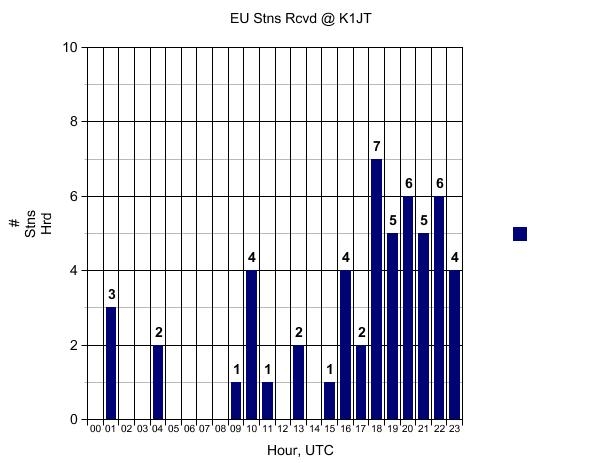
A few hours ago I checked the 20m WSPR data for the EU to NJ path during the past 24 hrs.....what a difference from the past weekend!  See for yourself:

Figure 1.  EU stations heard @ K1JT on May 21


Figure 2.  EU stations heard @ K1JT on May 24

Apparently condx were terrible over the weekend while my grabber was on 20.  The only dx station I heard was G6AVK and just for a few hours around 2300z.  If we had been on the past 24 hours I should have heard EU longer and probably louder.

The reason I'm interested in all this is that I've been thinking of moving my grabber to one of the higher bands during my local daylight  (1300z to 2300z) since that is usually when the dx comes thru to Florida.  But not being one to beat a dead horse I want to have some assurance of success.  My plan is to keep and eye on WSPR data as a guide to which bands and times to be QRV, particularly as a supplement to standard propagation predictions.

de w4hbk

Friday, April 15, 2011

WA5DJJ's new mept

Dave, WA5DJJ, has brought together some ideas to produce the ultimate QRP Labs mept modification that is stable in both time and frequency to make it adequate for image stacking.  To jog ur memories, it is possible to stack successive grabs using an astrophotography program called Rot'N'Stack to pull really weak signals out of the noise. To do so the message must appear at exactly the same place on the grab from one to the next, i.e., must be stable in both time and frequency. The SNR improves as the square root of the number of images stacked.  I'll leave it to Dave to describe his mods but basically it involves using the 4-component temperature controller I described in Part 2 of my series here on this blog and the change to a PIC keyer designed by Mike, N0QBH.  This latter mod allows a 32 kHz clock xtal to stabilize the timebase.

Last night I recorded the signal from Dave' new rig and the results were nothing short of phenomenal.  Over a period of 4 hours he drifted only 1 Hz, which as I told him could easily be my rx...the wx is wonderful now and we're leaving the windows open in the shack resulting large temperature changes.  The times base was virtually jitter free and started exactly on time every 10 minutes.  Figure 1 shows his signal as recorded on my 5 hr grabber. 

Figure 1.  5 hour grabber showing Dave's signal


Each of the short pulses represents a 10 minute grab as normally seen on my regular grabber.  I used 25 of the 10 minute grabs, going from 0717z to 1114z, in the Rot'n'Stack stacking program to produce the averaged image shown in Figure 2.  Even though Dave's signal was strong and didn't need stacking to bring it out of the noise, this provided an acid test of his rig's stability in both time and frequency.  The degree to which it is off will appear as blurring or jitter.  The timing is virtually perfect and what little frequency blur there is is caused by the 1 Hz drift over the recording time.

Figure 2.  Stacked average of 25 grabs


In addition to Dave's signal, several surprises popped out of the noise.  VK6JY is using a stabilized Hewlett-Packard signal generator which responded quite well to the stacking process.  There was no hint of N4FRE or ZL1EE even on the 5 hr grab which has a much better SNR than the 10 minute grabbs.  Both have highly stabilized signals via atomic clocks and/or GPS.  FRE usually drops completely out this time of night and if any of his signal was left it was completely obliterated by P29ZL.  It's ironic to be using sophisticated software and equipment to extract a 'local' station out from under one so far away (with an antenna  up in a banana tree no less).  However ZL's mept is not stabilized in time and thus averages at the same time FRE's builds up.  QRSS does have it's moments.

Congratulations to Dave on his new rig.  It looks like all the mods can be added directly to the rig so it will still fit in an Altoids tin.  Now if everybody adopts those mods then they too can pop out of the noise when stacking is applied.

de w4hbk

Thursday, February 24, 2011

Grabber Image Capture


I am using a program called SiteShoter to capture images from the various grabbers and collect them in a folder according to date and time. This allows me to watch for my MEPT at any of the usual on-line grabbers while away from the shack and then browse though them later to see how I did. You can even run several instances to record more than one grabber at a time. Last night, for example, I recorded the images being displayed at the EA1FAQ, VK7ZL and ZL2IK grabbers and then browsed them while enjoying my morning coffee. In addition it is easy to combine the images with QRSS Stitcher and make a long, compressed image like I record with my 5 hr grabber or do other processing.

Here's how it works:

1. Create a folder in which to place the images before running the program.

2. Enter the URL of the image at the grabber site. Obtain this by right-clicking on the image then selecting "Copy Image Location" and then pasting into the top box "Single URL/file".

ex. http://www.on5ex.be/grabber/capt.jpg for the image at the ON5EX grabber

3. Enter the path name to the save folder in the "File name" box. The file name is made from the desired date and time format you choose as explained in the documentation.

ex. C:\Documents and Settings\Desktop\SL3\%date:ddMMMyy%-%time:HHmm%.jpg

4. Enter the screenshot interval in the last box at the bottom. e.g., if the grabber's screen is 10 minutes wide enter 10 minutes.

The documentation is a bit skimpy on the other parameters so I ignored them except for the image size....a little trial and error will get what you want.

To make multiple recordings just run SiteShoter again and add the parameters for the other folder and image location.

73 bill w4hbk